Introduction
Have you noticed that Google sometimes shows an AI-generated answer before the usual website links? This feature is called Google AI Overviews, and it is changing how people find information online. Instead of visiting several websites to find an answer, users can now read an AI-generated summary at the top of some search results, along with links to useful sources.
For website owners and content creators, this means that getting noticed in Google Search involves more than simply targeting keywords. Creating helpful content that answers real questions, provides reliable information, and follows good SEO practices can improve your chances of appearing in AI Overviews. However, putting these practices into action requires a clear approach to content research, writing, and website optimization.
This guide walks you through the key steps, from researching what your audience wants to know and organizing your content to improving your website’s technical SEO and tracking your visibility in Google’s AI search features.
Understand How Google AI Overviews Work
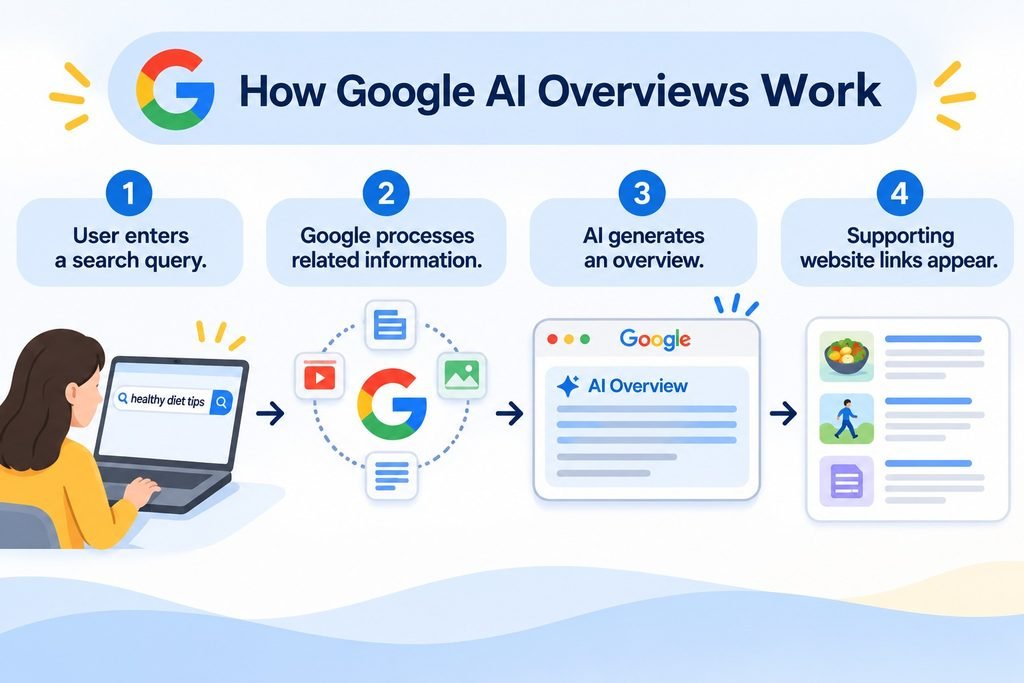
Google AI Overviews are AI-generated summaries that appear at the top of some Google search results. They help users find answers without visiting several websites. Google uses AI to understand a search query, gather relevant information from different web pages, and create a summary. It may also show links to websites where users can learn more about the topic.
For example, if someone searches for “how to improve website speed,” Google may show a summary of useful tips along with links to related websites.
AI Overviews do not appear for every search. Google shows them when it believes an AI-generated summary will be helpful. Website owners should therefore focus on creating useful, accurate, and easy-to-understand content. Understanding how this feature works is the first step toward improving your content for Google’s AI-powered search results.
How AI Overviews Fit Into Google’s Generative AI Search Experience
Google uses generative AI to make search results more helpful and easier to understand. AI Overviews are one part of this experience. They provide short answers to some searches by bringing together useful information from different websites. Users can read the summary, explore the links provided, or ask follow-up questions through Google’s AI search features where available.
This gives people more ways to find information and explore a topic. For website owners, it means creating clear, useful, and reliable content is important for both traditional search results and Google’s AI-powered search experience.
How Google Uses Search Queries to Generate AI Answers
When someone searches on Google, its AI systems try to understand what the person wants to know. They look at the search query and may explore related questions to find useful information from different websites. This process helps Google build a more complete answer instead of relying on just one page.
It then creates a short summary and may include links to relevant sources. For example, a search about healthy eating may lead Google to consider related topics such as balanced meals, food groups, and daily nutrition. This helps users explore a topic and find useful information more easily.
Why Related Search Queries Matter for Content Optimization
When learning how to optimize content for Google AI Overviews, focusing only on your main keyword is not enough. You should also consider the related questions people search for about the same topic. These questions help you understand what readers want to know and what information your content should cover.
For example, if you’re writing about Google AI Overviews, readers may also want to know how AI search works, how to improve content for AI search, and whether traditional SEO still matters. Including relevant answers makes your content more complete and useful. It also helps Google understand the different aspects of your topic.
Research the Questions Your Audience Wants Answered
Before creating content for Google AI Overviews, take time to understand what your audience is searching for. Your main keyword gives you a starting point, but readers often have other questions related to the same topic. Researching these questions helps you create content that covers the information people actually need.
You can use Google autocomplete, the People Also Ask section, and related searches to find common questions. You can also review competitor articles to see which topics they cover and where useful information may be missing. Use this research to plan your headings and decide which questions deserve a place in your article.
If you want to simplify this process, IntelliWriter SEO Keyword Research Tool can help you discover keyword ideas, explore search volume and competition, and find related search terms to guide your content planning.
Find Related Questions Beyond Your Main Keyword
Start by looking beyond your primary keyword to understand what else your audience wants to know. Use Google autocomplete, People Also Ask, and related searches to find common questions. For example, if your topic is Google AI Overviews optimization, people may also search for how to improve content for AI search or how to appear in AI Overviews. These questions can help you decide what information to include in your article.
Analyze Google Search Results to Identify Content Gaps
Search your main keyword on Google and review the pages that appear on the first page. Notice which topics competitors cover, how they organize their content, and what information they leave out. Look for opportunities to explain a point more clearly, add useful examples, or answer questions they have missed.
Match Your Content With the User’s Search Intent
Understand why people are searching before you start writing. Some want basic information, while others need practical steps or solutions. Make sure your content answers their actual questions rather than simply repeating keywords.
Structure Your Content to Communicate Answers Clearly
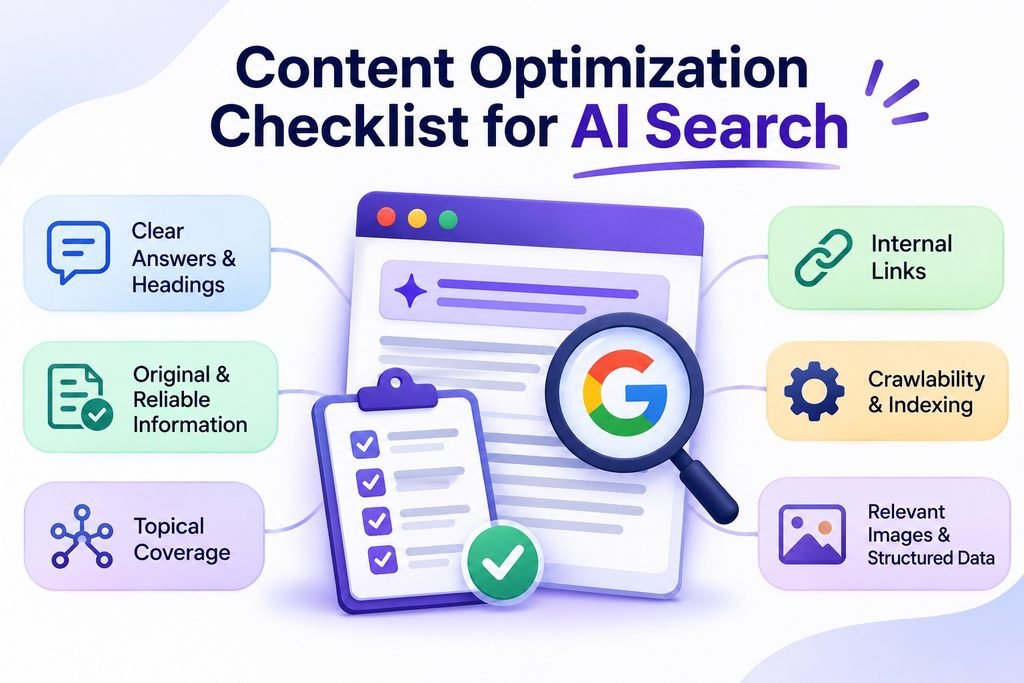
A well-organized article helps readers find the information they need without confusion. When learning how to optimize content for Google AI Overviews, focus on presenting information in a clear and logical order. Use simple language, short paragraphs, and headings that explain what each section covers. Avoid adding unnecessary details or repeating the same points. A clear structure makes your content easier to read and helps search engines understand the information on your page.
Address the Main Question Early in Your Content
Give readers a direct answer near the beginning of your article or section. Don’t make them read several paragraphs before finding the information they need. After answering the main question, explain the topic with useful details and examples.
Use Relevant Headings to Organize Each Topic
Divide your content into clear H2 and H3 headings. Each heading should introduce a specific idea and keep related information together. Avoid headings that repeat the same point.
Explain Complex Ideas With Examples, Lists, and Tables
Use simple examples, bullet points, and tables to explain information that may be difficult to understand. These formats make important details easier to follow and help readers find answers quickly.
Once your outline is ready, you can use an AI article writing tool to help develop your sections into a first draft. Review the generated content, verify its information, and add your own insights before publishing.
Create Helpful, Original, and Trustworthy Content
A well-organized article helps readers find the information they need without confusion. When learning how to optimize content for Google AI Overviews, focus on presenting information in a clear and logical order. Use simple language, short paragraphs, and headings that explain what each section covers.
Avoid adding unnecessary details or repeating the same points. A clear structure makes your content easier to read and helps search engines understand the information on your page.
Include First-Hand Experience and Practical Examples
Share real examples, screenshots, or lessons from your own work whenever possible. For example, when explaining AI search optimization, show how you improved a heading or made a blog section easier to understand. Practical examples make your advice more useful and easier to follow.
Add Original Research, Data, and Expert Insights
Use your own research, relevant data, and expert opinions to provide information that adds something new to the topic. If you include statistics, make sure they are accurate and explain what they mean.
Support Important Claims With Reliable Sources
Back up important facts with trustworthy sources, such as Google’s official documentation, research studies, and industry reports. Check information before publishing and link to the original source when appropriate.
Cover Related Topics and Build Topical Authority
Covering related topics helps you create more complete content instead of focusing on just one keyword. When learning how to optimize content for Google AI Overviews, think about the other questions readers may have about your main topic. Answer these questions naturally and include information that helps readers understand the subject better. This also helps you build topical authority by showing your knowledge across related subjects.
Answer Supporting Questions Naturally Within Your Content
Include relevant questions and answers where they fit. For example, an article about Google AI Overviews can also explain how AI search works and how traditional SEO supports content visibility.
Build Relevant Topic Clusters for AI Search
Create separate articles around closely related topics and connect them to a main guide. For example, you can build supporting articles about AI search optimization, GEO, and AI content writing.
Use Internal Links to Connect Related Content
Link to relevant articles on your website using clear, descriptive anchor text. This helps readers explore related information and helps search engines understand the connection between your pages.
Improve Your Website’s Technical Readiness for AI Overviews
Good content needs a website that Google can access and understand. Even if your article provides useful information, technical problems can prevent Google from finding or showing it in search results. When working on Google AI Overviews optimization, make sure your pages follow Google’s basic technical SEO requirements.
Your website should be easy to crawl, properly indexed, and accessible on different devices. These steps help make your content eligible to appear as a supporting link in AI Overviews, although they do not guarantee inclusion.
Make Sure Google Can Crawl and Index Your Pages
Check that Google can access your important pages and that they are indexed. You can use Google Search Console’s URL Inspection tool to identify crawling or indexing problems.
Check Robots.txt and Search Snippet Settings
Review your robots.txt file to make sure you are not blocking Googlebot from important pages. Also, check settings such as noindex and nosnippet, which can limit how your content appears in search results.
Make Important Content Available in Text
Keep important information in readable text instead of placing everything inside images or videos. Use clear headings and descriptive text to help readers and search engines understand your content.
Use Structured Data That Matches Your Visible Content
Add relevant structured data when appropriate, and make sure it accurately describes the information visitors can see on your page. Google does not require special schema markup for AI Overviews.
Use Images and Videos to Make Your Content More Helpful
Images and videos can make your content easier to understand and more interesting to read. When learning how to optimize content for Google AI Overviews, don’t focus only on written information. Add relevant visuals that explain ideas, show examples, or guide readers through a process.
For example, you can use original screenshots to show where AI Overviews appear in Google Search or add a short video to explain an SEO process. Make sure your images and videos are clear, useful, and related to the topic.
Also, add descriptive alt text to important images so people using screen readers can understand what they show. Keep important information in text rather than relying only on visuals. This makes your content more accessible and useful to readers.
Measure Your Visibility in Google’s AI Search Features
Tracking your website’s performance helps you understand whether your content is reaching the right audience. Google Search Console now provides a Generative AI Performance Report that helps website owners monitor their visibility in Google’s AI search features. You can use it to see how often your pages appear in AI Overviews and AI Mode and track changes in impressions over time.
Monitor Search Performance Using Google Search Console
Open the Generative AI Performance Report in Google Search Console to review impressions from AI Overviews and AI Mode. You can also check which pages receive the most impressions and explore performance by country, device, and date.
Identify Pages That Need Improvement
Review which pages receive AI impressions and which have limited visibility. Use this information to identify content that may need clearer explanations, updated information, or more useful examples. Also, check your regular Search Console performance data to understand how these pages perform in traditional search results.
Compare AI Search Visibility With Traditional SEO Performance
Compare your generative AI impressions with your regular organic search performance to understand how your visibility changes across different Google search experiences. Remember that the Generative AI Performance Report focuses on impressions, not a complete breakdown of clicks, rankings, or exact search queries. Use both reports to make informed decisions about your content strategy.
Common Mistakes to Avoid When Optimizing for AI Overviews
Optimizing content for Google AI Overviews is not about using shortcuts or repeating SEO techniques. It requires useful information, clear answers, and a reliable website. Avoid these common mistakes and apply the practical fixes to improve your content.
Publishing Generic AI-Generated Content
AI-generated content can sound repetitive and lack useful details when published without editing.
Practical fix: Review your AI draft paragraph by paragraph. Remove repeated or irrelevant sentences, verify facts against reliable sources, and replace generic explanations with specific examples, original insights, or lessons from your own experience.
Repeating Keywords Instead of Answering Questions
Repeating the same keyword throughout an article makes the content unnatural and does not help readers find better answers.
Practical fix: Identify the main question behind your target keyword. Use the primary keyword naturally in the title, introduction, and relevant headings. Then answer related questions using natural language instead of forcing the same phrase into every paragraph.
Creating Unnecessary Pages for Related Searches
Publishing separate articles for very similar questions can create repetitive content and make it harder to maintain your website.
Practical fix: Compare the search intent of related keywords before creating new pages. If readers are looking for the same information, answer those questions in one well-organized article. Create a separate page only when the question requires a different focus or a more detailed explanation.
Relying on Special Schema or AI SEO Tricks
Some websites promote special markup or shortcuts as guaranteed ways to appear in AI Overviews. However, Google does not provide a special schema that guarantees inclusion.
Practical fix: Check Google’s structured data documentation before adding markup. Choose a relevant schema type, ensure it matches the visible content, and test it with Google’s Rich Results Test when supported. Avoid adding markup simply to target AI Overviews.
Expecting High Rankings to Guarantee AI Citations
A page ranking well in traditional search results is not guaranteed to appear as a source in an AI Overview.
Practical fix: Review your content for accuracy, missing information, and unclear explanations. Check whether it answers the main question and provides useful supporting details. Monitor Search Console performance, review relevant AI search results manually, and update your content when needed.
How Intelliwriter Can Support Your AI Search Optimization Workflow
Optimizing content for Google AI Overviews involves more than writing an article. You also need to research relevant topics, organize information, improve content quality, and maintain your website’s SEO. IntelliWriter brings several tools together to support this process.
Its AI Article Writer helps create structured drafts, while the Topical Authority Builder helps organize related topics into content clusters. You can further improve your articles with the SEO Checker and AI Humanizer, or use the Image Generator to create relevant visuals. For WordPress websites, its Super SEO Agents support tasks such as metadata optimization, content improvements, and website management.
These features can make research, writing, and SEO tasks easier to manage. However, no tool can guarantee inclusion in Google AI Overviews. Your content still needs to provide accurate, original, and genuinely helpful information.
Frequently Asked Questions
How Can I Optimize My Website for Google AI Overviews?
Create helpful, accurate, and well-organized content that directly answers users’ questions. Follow technical SEO best practices, keep important pages accessible to Google, and provide relevant examples and reliable information.
How Do I Rank in Google AI Overviews?
There is no guaranteed way to rank in AI Overviews. Focus on creating original, trustworthy content, answering search queries clearly, and following Google’s SEO guidelines. Google decides which sources to include in its AI-generated answers.
Does Traditional SEO Help With AI Search Optimization?
Yes. Traditional SEO practices such as creating helpful content, improving website accessibility, using clear headings, and building relevant internal links also support visibility in Google’s AI search features.
Can AI-Generated Content Appear in Google AI Overviews?
Yes. Google does not prohibit AI-generated content from appearing in Search or AI Overviews. However, content should be accurate, original, helpful, and created for users rather than simply produced to manipulate search rankings.
Does Structured Data Help With AI Overviews?
Structured data helps Google understand the information on a page and can make content eligible for certain rich results. However, Google does not require special schema markup for AI Overviews, and structured data does not guarantee inclusion.
What Is the Difference Between GEO and Traditional SEO?
Traditional SEO focuses on improving a website’s visibility in search engine results. Generative Engine Optimization (GEO) focuses on making content easier for AI-powered search tools to understand, use, and potentially cite in generated answers. Both approaches benefit from helpful, reliable content.
Final Thoughts
Google AI Overviews are changing how people discover information, but creating helpful content remains essential. To improve your chances of appearing in AI-generated search results, focus on understanding your audience, answering their questions clearly, and providing accurate, original information.
Organize your content with relevant headings, strengthen your website’s technical SEO, and use useful images and examples to make information easier to understand. Remember that no specific technique can guarantee inclusion in AI Overviews. Instead of chasing shortcuts, build a content strategy around quality, relevance, and user experience.
Keep monitoring your search performance and updating your content as search continues to evolve.
Leave a Reply